AudioDriven
Audio-reactive motion for After Effects, natively.
After Effects can already convert audio to keyframes. It just gives you one unshaped channel and thousands of raw keys. AudioDriven analyses your audio by frequency band, shapes it into usable motion, and hands you live controls you can tune by eye before baking anything down.
Raw keyframes aren't motion.
Native "Convert Audio to Keyframes" gives you a single blended amplitude channel: a jagged graph with hundreds of keys that reacts to everything at once. Shaping it into something usable means manual smoothing, expression work, and starting over every time the track changes.
- React to one frequency range (just the kick, just the vocal) instead of the whole mix.
- Tune intensity and smoothness live, while the timeline plays, rather than guessing.
- Keep it editable until you're happy, then bake to standard keyframes.
Built for how motion actually gets made.
Multi-band frequency isolation
Five bands: Sub, Bass, Low-Mid, High-Mid and Presence. Drive a logo from the kick and a background from the vocals, independently, from the same track.
Live, tunable drives
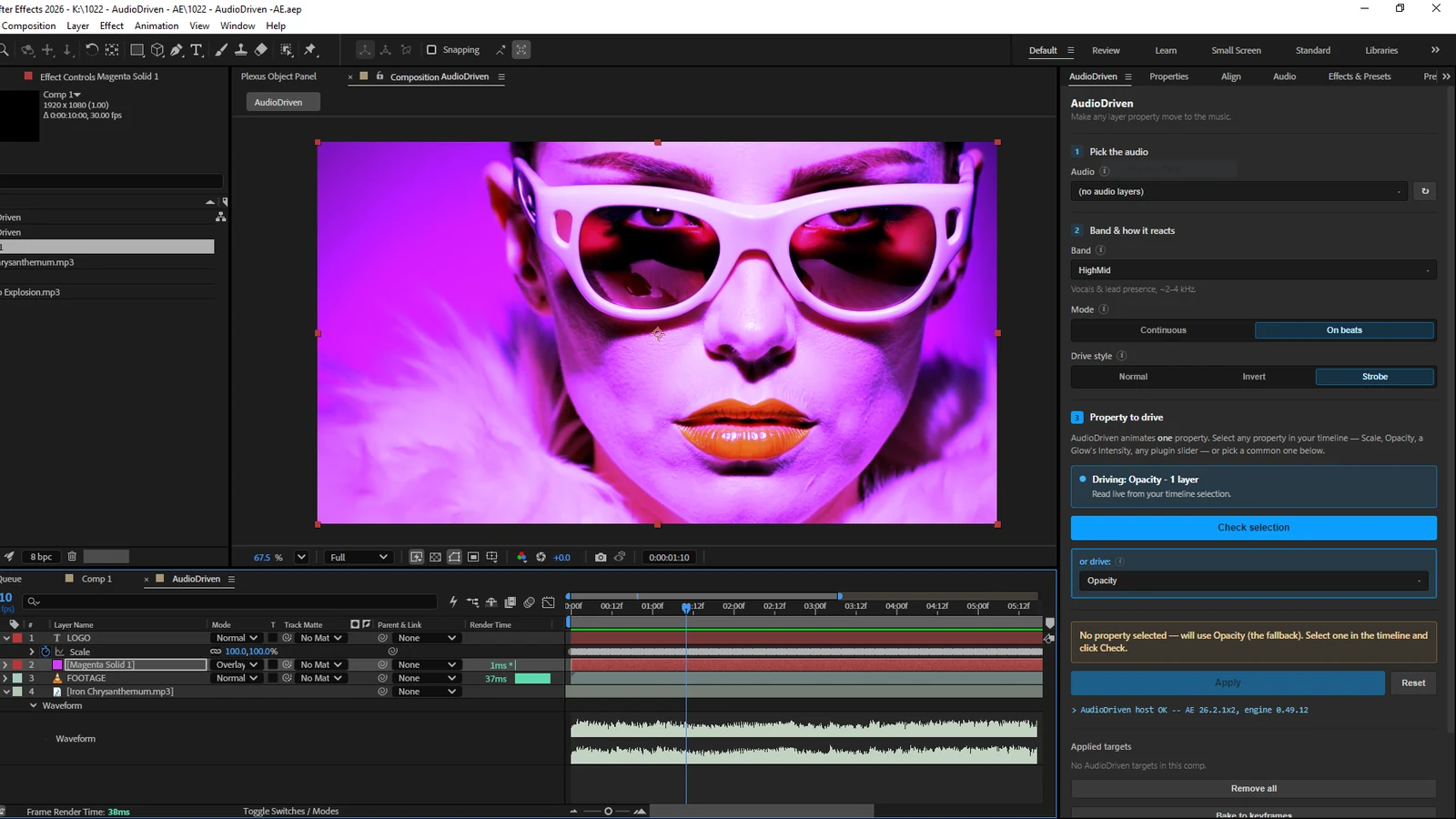
Every mapping gets a control null with real-time Intensity and Smoothness sliders. Dial the reaction in by eye while scrubbing. Nothing is committed until you say so.
Continuous or on-beat
Two reaction modes from one engine: flowing audio-reactive movement, or sharp hits triggered by onset detection. Choose per mapping.
Property-first workflow
Select a property in your timeline and hit Apply. No manual keyframing, no expression writing, no rigging a control layer by hand.
One-click bake
Freeze any drive to standard keyframes when you're happy. Render-farm safe, and the result keeps working with the plugin uninstalled.
Colour & visualisers
Drive Brightness, Blend and Hue for audio-reactive grading, plus a built-in EQ Spectrum Bars generator for instant audiogram-style visualisers.
Three steps, no expressions.
Select a property
Click the property you want to animate in your timeline: scale, opacity, position, a colour control. AudioDriven reads your selection directly.
Choose a band & mode
Pick the frequency range to react to, choose Continuous or On Beats, and set a drive style: Normal, Invert or Strobe.
Tune, then bake
Adjust Intensity and Smoothness live until the motion feels right. Bake to keyframes when you're done, or leave it live and editable.
See it working.


Technical detail.
- Format
- Adobe CEP extension: an HTML/CSS/JS panel driving a headless ExtendScript engine.
- Platform
- Windows. Built and verified on Windows; macOS support is under consideration.
- After Effects
- Developed and tested against After Effects 2026. Broader version support is being verified before it's advertised.
- Dependencies
- None beyond After Effects itself. No external binaries, no AI components, and no network calls. Everything runs locally.
- Performance
- Analysis runs once when you hit Apply (a few seconds on longer clips) and costs nothing at render time. Not GPU-accelerated; it doesn't need to be.
- Testing
- 114 automated tests running against real After Effects, all passing, plus a full manual verification pass.
- Licence
- Perpetual. Buy once, own it. No subscription.
More tools for After Effects.
Working with audio-driven motion?
AudioDriven turns any audio into clean, tunable motion natively inside After Effects. Questions, feature requests or thoughts from your own workflow? We'd like to hear them.